Home / App / Release Notes

Release Notes

The Fernox App and matching web portal will undergo regular changes over the coming months and years, including new version releases, new feature releases, new country launches, enhancements, security updates, policy changes, and bug fixes.

This release notes page will be kept up to date with all the changes rolled out for public use.

Fernox Portal Update December 2025

We’re excited to share a major update to the Fernox Portal, bringing a range of improvements across the entire platform for both general users and managers, along with an early look at powerful new features currently in development.

Updates for All Users 
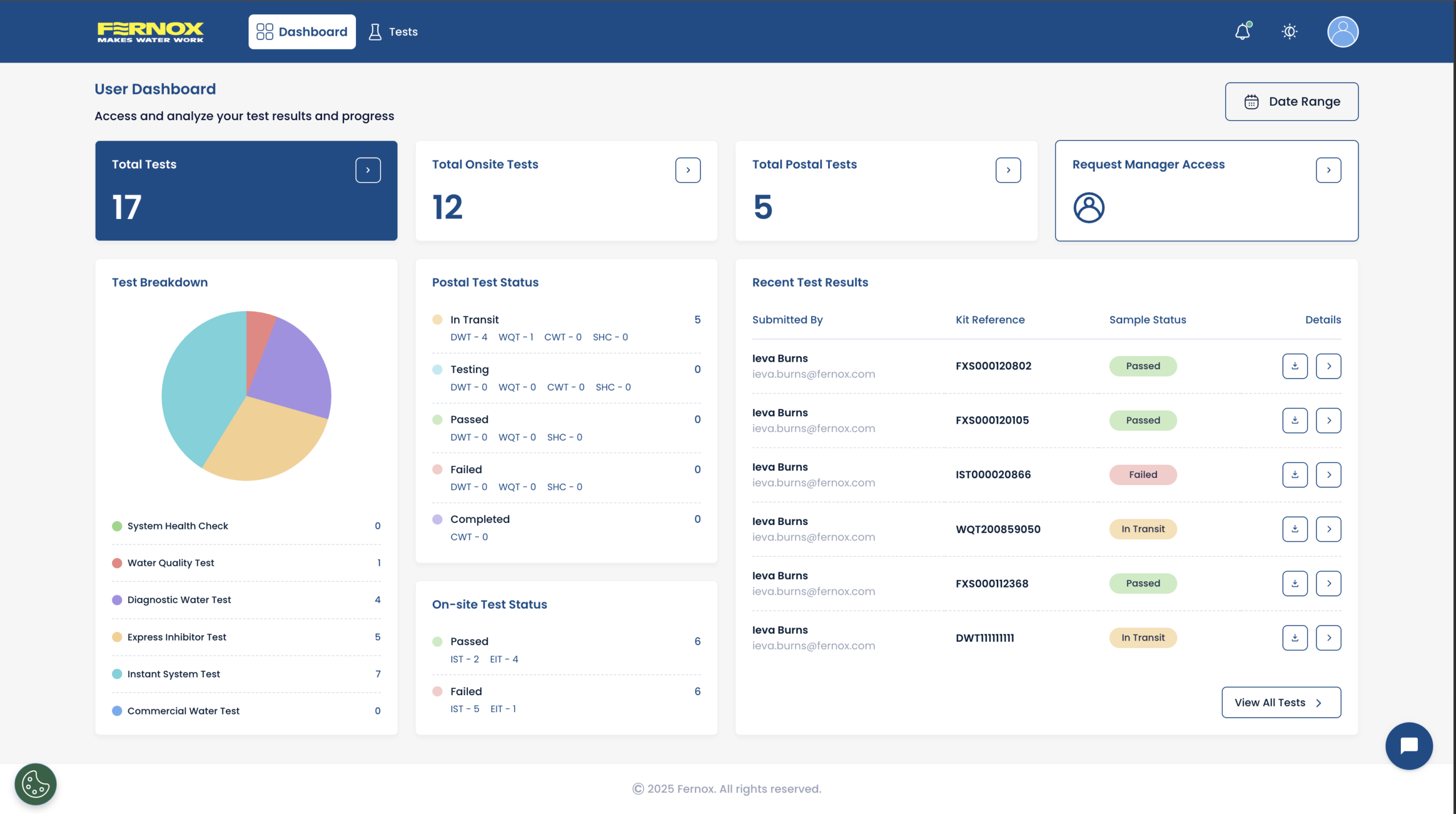
New Dashboard Experience

The dashboard has been redesigned to give users a cleaner and more intuitive overview of their activity. 

Key improvements include: 

  • A clearer breakdown of total tests and test types. 
  • A visually improved layout that makes it easier to understand trends at a glance. 
Quick Links for Faster Navigation

We’ve introduced a set of Quick Links that provide immediate access to core test sections: 

  • Total tests
  • On-site tests
  • Postal tests 

These links are always visible on the dashboard, helping user’s shortcut their usual workflows and reach test lists with a single click.
 

Test Page Enhancements

Updated interface with improved row hierarchy for quicker, easier scanning.

  • Test type filtering has been streamlined and moved to sit alongside the other filters.
  • Quickly clear the filters shown under the search bar with a single click.
  • Users can now filter multiple test types at the same time.

Improved Profile Management

The Profile section has been fully rebuilt to give users complete visibility and control over their account and an overview of managers that can view their tests.

From their Profile users can now: 
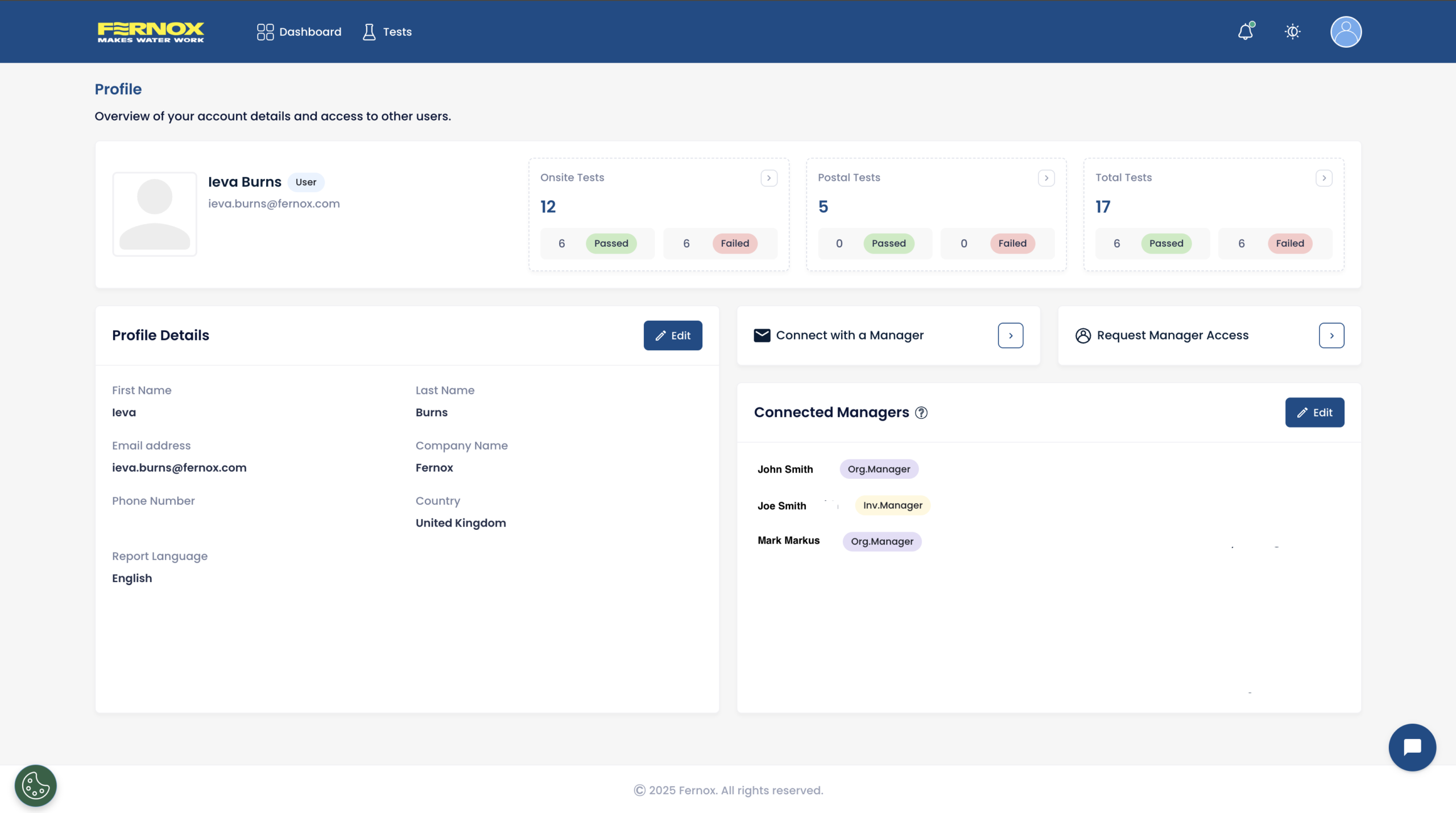
  • Easily connect with a manager. 
  • See a real-time list of managers who currently have access to their samples. 
  • Edit or revoke access for manually linked managers. 
  • Users can request manager access directly from their Profile. 


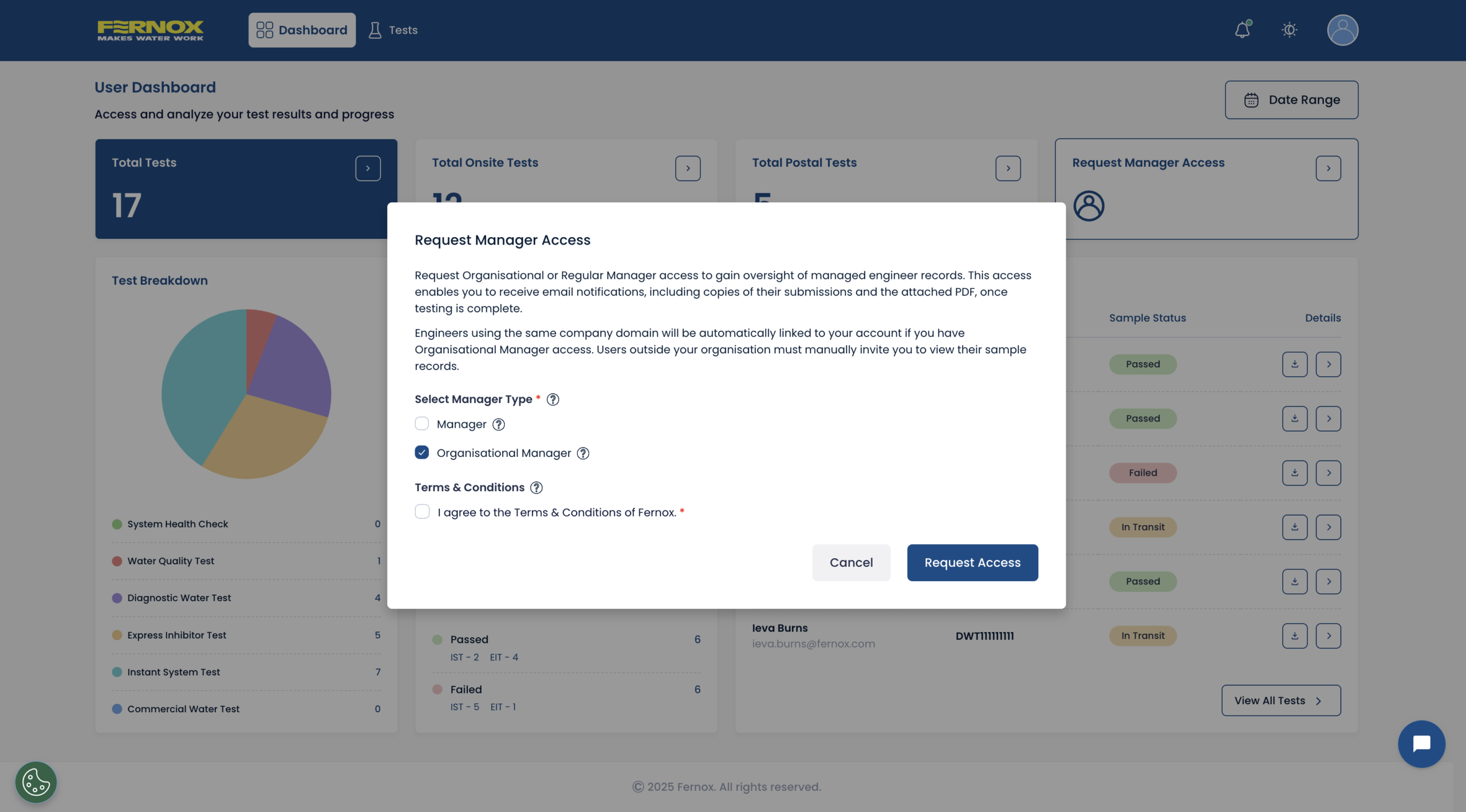
Simplified Manager Access Requests

Requesting manager access is now easier—available from the dashboard Quick Links or the profile navigation bar. 


New Settings Page

A fully centralised settings page is now available with expanded configuration options: 
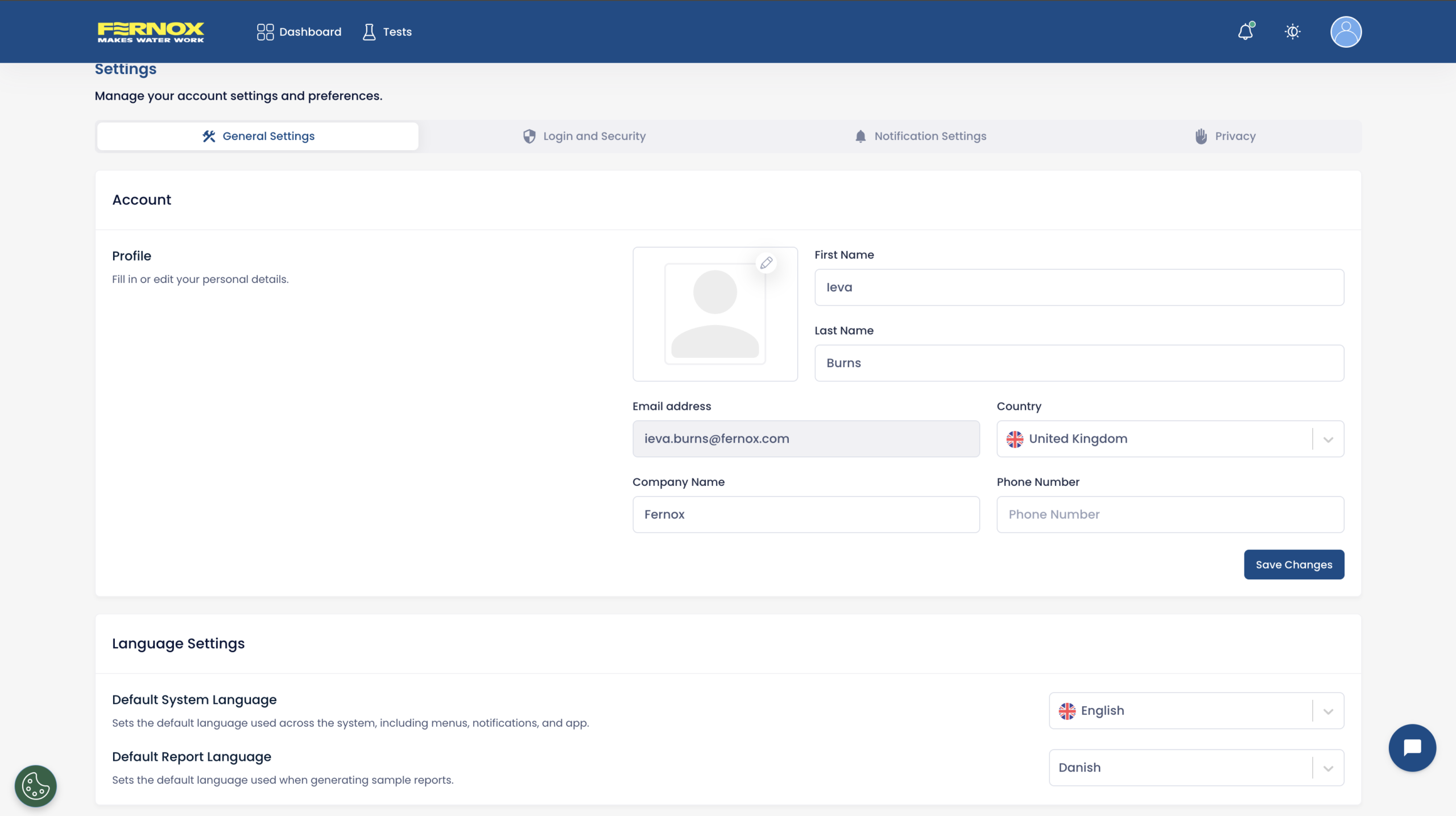
  • Account details – update name, company, or contact information.
  • System language – switch between supported languages easily.
  • Test report language – choose a preferred language for automatically generated PDF reports.
  • Notification preferences – optional email report copies can now be turned off to avoid inbox clutter.
  • Policies – access Terms, Privacy Policies, and data management information in one place.
  • Login & security – improved access to password controls and security options. 


Updates for Managers
User Invitations for Organisational Managers

Organisational managers now have more powerful onboarding tools. 

  • Invite users directly via email. 
  • Share an invite link for quick-signup access. 
  • Benefit from automatic linking: users with the same email domain will be synced to the organisation without manual setup. 

This speeds up onboarding, especially for large teams or multi-site organisations.


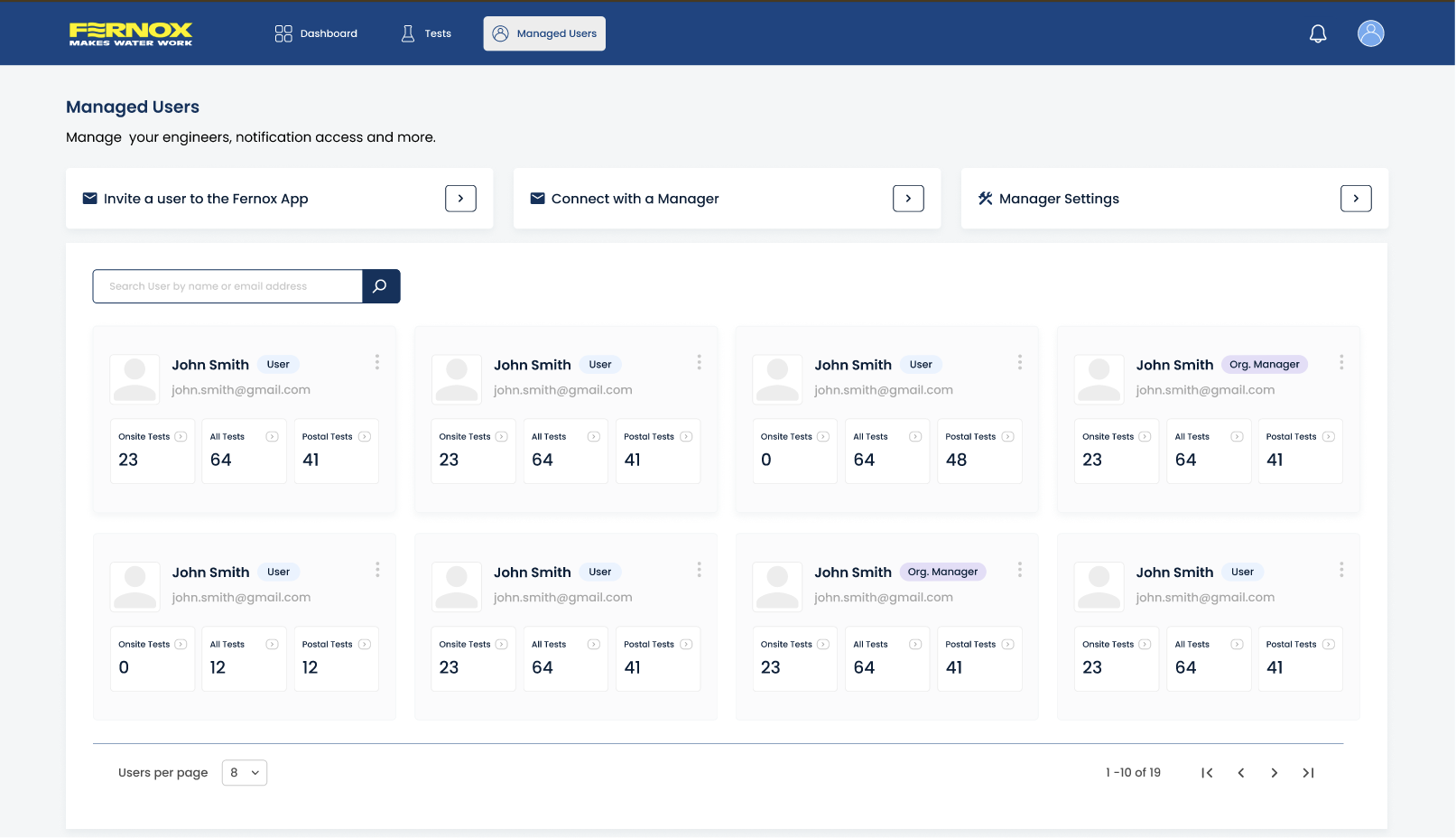
Managed Users Overview

Managers can now view all managed users in a single, organised overview inside the manager access page: 

  • Quick Links for inviting new users into the Fernox App. 
  • Controls for managing incoming email reports from managed user to avoid unnecessary email inbox clutter. 
  • See each user’s total, on-site, and postal test submissions at a glance.  
  • Jump directly into a user’s test list, where filters are automatically applied for convenience. 

This gives managers a complete operational dashboard for monitoring team performance. 


Features Coming Soon 
Map View for Test Samples

A new geographical map overview will soon allow users and managers to: 

  • Visualise sample locations. 
  • Identify regional trends. 

More details will follow closer to launch. 

Data Export Function

The upcoming data export tool will allow users to: 

  • Export test data into CSV or XLSX formats. 
  • Perform bulk PDF report exports at the same time. 
  • Filter and refine which data sets to export before downloading. 
Advanced Filtering Options

More powerful filtering is being built to allow users to narrow tests by: 

  • Project reference 
  • Customer reference 
  • Postcodes 
  • Test type 
  • And many more fields… 

These refined filters will make it significantly easier to analyse and report on large sets of samples. 


Questions / Support


For any questions or if you need assistance during this transition, you can visit our new support page,check out our Guides & Instructions to help your transition to the new Fernox App or contact you local Fernox sales representative. For any urgent questions, please use the live chat, available Monday – Friday, 9am – 5pm (UK, GMT+1).

We appreciate your understanding and support as we make these improvements to provide you with a better, more efficient water testing experience.

Thank you for your continued feedback—these updates are driven by your suggestions and aimed at improving your day-to-day experience on the portal. 


Fernox App Updates: August

Over the past month, we’ve been working hard to improve your Fernox experience. Here’s what’s new:

Fernox App
  • Offline submission issue resolved – you can now submit tests offline without interruptions.

  • Report language change now available for postal samples.

  • Minor UI enhancements for a smoother experience.

Fernox Web Portal
  • Manager enhancements – Managers and Organisational Managers can now manage user email notifications and control whether sample report notifications are sent.

  • Report language change for postal samples (WQT, DWT, CFT, and CQT) directly in the portal – view or download in any language.

  • Minor UI improvements.

Test Form Improvements

New “Servicing” option added to the Reason for Sampling dropdown.

Questions / Support

For any questions or if you need assistance during this transition, you can visit our new support page, check out our Guides & Instructions to help your transition to the new Fernox App or contact you local Fernox sales representative. For any urgent questions, please use the live chat, available Monday – Friday, 9am – 5pm (UK, GMT+1).

We appreciate your understanding and support as we make these improvements to provide you with a better, more efficient water testing experience.

Thank you for your continued trust in Fernox.


Old Zoho platform switch off

All postal water testing data has now been successfully moved over to the new Fernox App, completing the data migration process. We are now continuing the Fernox App rollout plan with some changes to the older systems.

Old Water Test App Deactivation – Monday 7th July

The new Fernox App and associated web portal (fernox.app) have been successfully live for a month, and on Monday 7th July, we are closing down the various Water Test Apps which have been previously used for the past 6+ years.

This means that the old web portal will no longer be accessible, and the Water Test App on iOS and Android which you might still have installed on your devices will also cease to operate, and can be deleted. We are unable to remove the application from your device remotely.

Migrated Water Testing Data

All water testing submissions for the last 5 years (as per privacy policy) from the old Water Test Apps have already been moved across to the new Fernox App.

Water testing data on the new Fernox App is now stored for a 10 year period, mainly to meet customer feedback requests, but also to comply with new heat appliance manufacturer warranty terms, which are frequently 10 years.
 

Sharing Data With Managers

As part of your role, you might be required to share your water test submissions with other users, which we refer to as ‘Managers’, giving them additional permissions to view data either from everyone within their organisation, or to specific users whom they are invited to see. You can see more information by clicking here.

Download the Fernox App
If you are looking to download the new Fernox App, please click the relevant link below.



Questions / Support
For any questions or if you need assistance during this transition, you can visit our new support page, check out our Guides & Instructions to help your transition to the new Fernox App or contact you local Fernox sales representative. For any urgent questions, please use the live chat, available Monday – Friday, 9am – 5pm (UK, GMT+1).

We appreciate your understanding and support as we make these improvements to provide you with a better, more efficient water testing experience.

Thank you for your continued trust in Fernox.


Fernox App Migration: Full Switch

On Monday, 26th May, we transitioned all users from the old Fernox Water Test Apps to our brand-new Fernox App for all on-site water testing, which went smoothly without any incidents.

We are now ready to transition all processes for postal water testing to the new Fernox App, along with all previously submitted postal water testing data.

Key Changes Effective on June 2nd

Postal Water Testing
From 2nd June onwards, you can no longer add new postal water tests using the current Water Test App. To continue adding new samples, please download the new Fernox App via the links below.

Data Migration

Your existing user data up until the end of April 2025 will be imported into the new Fernox App and will be ready when you first log in with the same email address used in the old water test app.

Data from 1st May to 1st June will be transferred by 6th June. We will send you an email confirmation once this migration is complete. To ensure the transition of your data is seamless, please register with the same email address you are currently using in the old Water Test App.

Questions / Support
For any questions or if you need assistance during this transition, you can visit our new support page, check out our Guides & Instructions to help your transition to the new Fernox App or contact you local Fernox sales representative. For any urgent questions, please use the live chat, available Monday – Friday, 9am – 5pm (UK, GMT+1).

We appreciate your understanding and support as we make these improvements to provide you with a better, more efficient water testing experience.

Thank you for your continued trust in Fernox.

Getting Started with the New Fernox App
  1. Download the App: Access and download the app directly from your app store.
  2. Register: Sign up as a new user utilizing your current ‘Water Test App’ email for smooth data migration.
  3. Begin Testing: Effortlessly start submitting on-site tests using the new platform.


Fernox App Migration: On-site Testing

As we transition from our old apps to the new Fernox App, you’ll experience several key changes that aim to enhance your water testing capabilities.

On-Site Water Testing
  • Transition Date: Starting May 26th, new on-site water tests can no longer be initiated using the current app. All future on-site testing, including the Instant System Test and Express Inhibitor Test, should be conducted using the new Fernox App.
  • Action Required: Download the new Fernox App from your app store through the links provided below.
Data Migration
  • Initial Migration: User data up until May 19th, 2025, will be migrated to the new Fernox App, accessible upon your first login.
  • Additional Data Transfer: Data collected between May 19th and May 26th will be migrated by May 30th. Users will receive email confirmation once this process is complete.
  • Important: Register on the new Fernox App using the same email address as your current Water Test App account for seamless data transition.
Postal Water Tests
  • Current Usage: Continue using the existing app for postal water tests.
  • Future Integration: We are working on adding postal test capabilities to the new Fernox App. Updates will follow soon regarding this development.
Getting Started with the New Fernox App
  1. Download the App: Access and download the app directly from your app store.
  2. Register: Sign up as a new user utilizing your current ‘Water Test App’ email for smooth data migration.
  3. Begin Testing: Effortlessly start submitting on-site tests using the new platform.

Need Help?

For any inquiries or assistance during this transition, please reach out:


V1 Initial Launch

We are happy to launch the New Fernox App, now available to download on iOS and Google Play in the UK and Ireland.

This initial version allows quick and easy submission of the range of on-site tests, with the features for postal testing coming at a later date.

Some key updates from the current Water Test Apps on the New Fernox App:

  • The design and user experience have been completely overhauled, with emphasis on simplicity and dynamic automation.
  • Users can invite their managers to view their water test submissions directly from within the mobile app or web portal.
  • Registering has been made more efficient by introducing a one-time passcode, instead of an email password link.
  • Security has been increased and now gives optional (recommended) settings such as FaceID/Biometric/Passcode login and app opening.
  • New integration of a global address finder, including company names, streamlines the input of property details.
  • Smart features such as selectable previously entered addresses, enabling automatic property re-testing recognition.


Download the mobile application – Click Here

Access the web portal – https://fernox.app/ 

Country