

This update includes improvements to reporting, mobile stability, and pH test updates.
We are introducing an update to support new pH strip versions:
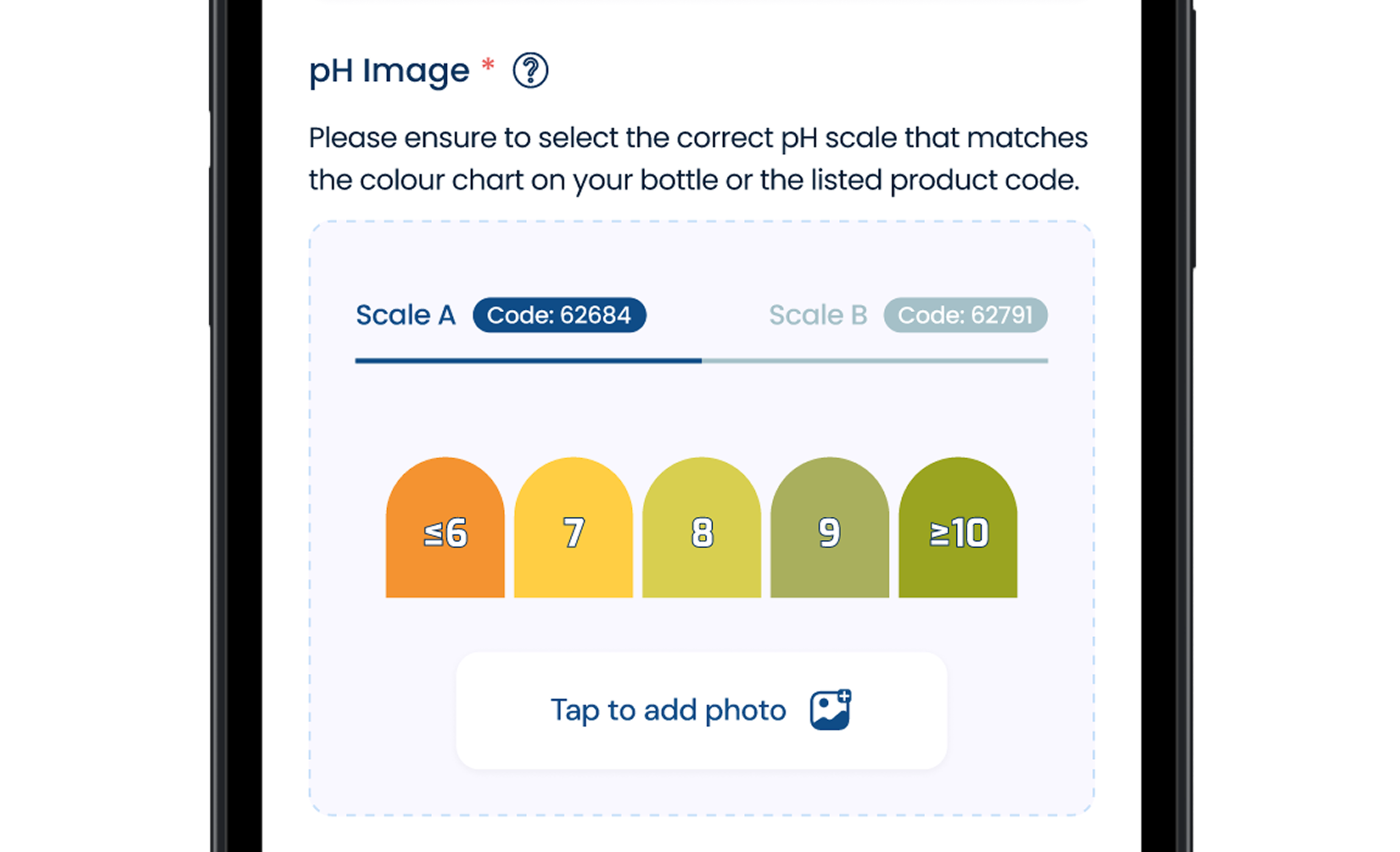
Please ensure you select the correct strip version when entering test data.
We have improved the layout of on-site test reports to enhance clarity and presentation.
What’s new:
If you have any questions or need assistance:
For any urgent questions, please use the live chat, available Monday – Friday, 9am – 5pm (UK, GMT+1).
We appreciate your understanding and support as we make these improvements to provide you with a better, more efficient water testing experience.
Thank you for your feedback — these updates are designed to enhance your portal experience.
Esta actualización incluye mejoras en la generación de informes, la estabilidad móvil y las pruebas de pH.
Presentamos una actualización para admitir las nuevas versiones de tiras de pH:
Asegúrese de seleccionar la versión correcta de la tira al introducir los datos de la prueba.
Hemos mejorado el diseño de los informes de pruebas in situ para aumentar la claridad y la presentación.
Novedades:
Si tiene alguna pregunta o necesita ayuda:
Para cualquier pregunta urgente, utilice el chat en vivo, disponible de lunes a viernes, de 9:00 a 17:00 (Reino Unido, GMT+1).
Agradecemos su comprensión y apoyo mientras realizamos estas mejoras para ofrecerle una experiencia de análisis de agua mejor y más eficiente.
Gracias por sus comentarios: estas actualizaciones están diseñadas para mejorar su experiencia en el portal.
Wir freuen uns, Ihnen mehrere Verbesserungen des Portals vorstellen zu können, die Ihnen mehr Transparenz, Kontrolle und Einblick in Ihre Wasserproben-Testdaten bieten sollen.
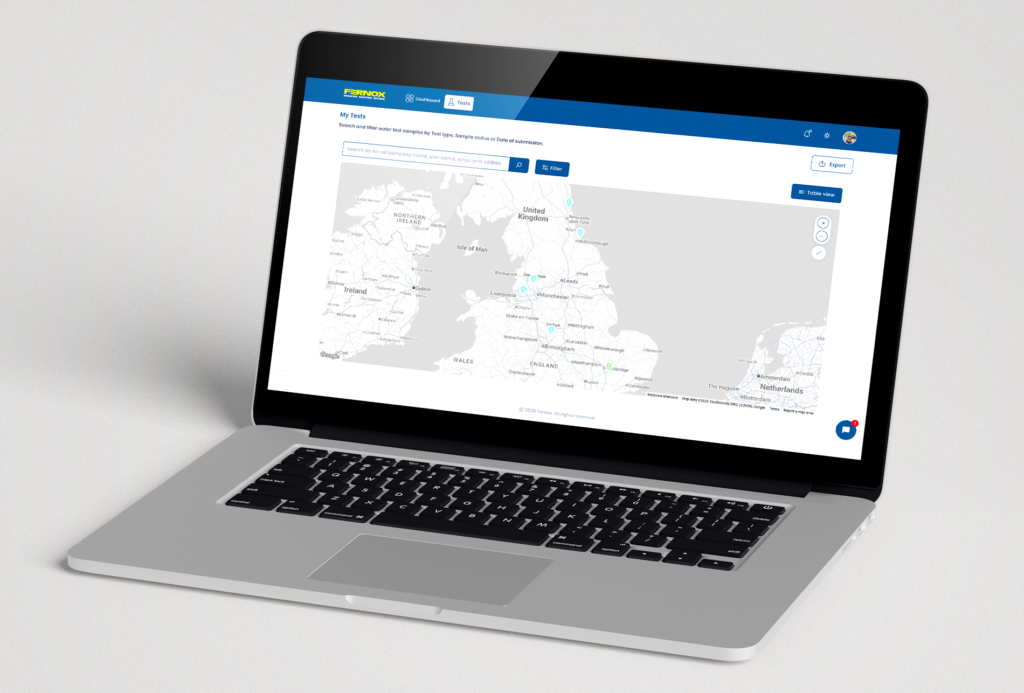
Eine neue Exportfunktion ist jetzt verfügbar, mit der Sie Ihre Testbeispieldaten einfacher extrahieren, analysieren und weitergeben können.
Neuerungen:
– Filtern Sie Ihre Tests direkt auf der Seite „Tests“ nach Testtyp.
– Passen Sie Ihren Export an, indem Sie nur die Testfelder auswählen, die Sie benötigen.
– Exportieren Sie nur Tests, die bestimmte Kriterien erfüllen (fehlgeschlagene Ergebnisse, Postleitzahl, Parameter).
– Laden Sie Daten im CSV- oder XLSX-Format herunter.
Dieses Update bietet mehr Flexibilität für Compliance-Berichte, interne Überprüfungen und Datenanalysen.
Wir haben außerdem die Kartenansicht eingeführt, eine neue visuelle Möglichkeit, Ihre Stichprobendaten ab Januar 2025 zu erkunden.
Mit der Kartenansicht können Sie:
– Sehen Sie sich die genaue geografische Position der eingereichten Proben, einschließlich der von Ihnen oder Ihren verwalteten Benutzern durchgeführten Tests, auf einer interaktiven Karte an.
– Filtern Sie Proben direkt auf der Karte nach Testtyp und Probenstatus (bestanden, nicht bestanden oder ausstehend).
– Identifizieren Sie geografische Muster und Häufungen nicht bestandener Tests, um potenzielle Probleme aufzudecken und Folgemaßnahmen zu priorisieren..
Die Kartenansicht bietet eine übersichtlichere und intuitivere Möglichkeit, Trends zu verstehen, Risiken zu managen und proaktive Entscheidungen an allen Ihren Standorten zu unterstützen.
Wenn Sie Fragen haben oder Hilfe benötigen:
Bei dringenden Fragen nutzen Sie bitte den Live-Chat, der montags bis freitags von 9 bis 17 Uhr (britische Zeit, GMT+1) verfügbar ist.
Wir danken Ihnen für Ihr Verständnis und Ihre Unterstützung, während wir diese Verbesserungen vornehmen, um Ihnen ein besseres und effizienteres Wasseruntersuchungserlebnis zu bieten.
Vielen Dank für Ihr Feedback – diese Aktualisierungen sollen Ihr Portal-Erlebnis verbessern.
Nos complace compartir varias mejoras en el portal, diseñadas para brindarle mayor visibilidad, control y conocimiento sobre los datos de sus muestras de análisis de agua.
Ahora hay disponible una nueva función de exportación que facilita la extracción, el análisis y el intercambio de los datos de las muestras de prueba.
Novedades:
Esta actualización proporciona una mayor flexibilidad para la presentación de informes de cumplimiento, las revisiones internas y el análisis de datos.
También hemos introducido la vista de mapa, una nueva forma visual de explorar sus datos de muestreo a partir de enero de 2025.
Con la vista de mapa, puedes:
La vista de mapa ofrece una forma más clara e intuitiva de comprender las tendencias, gestionar los riesgos y respaldar la toma de decisiones proactiva en todos sus sitios.
Si tiene alguna pregunta o necesita ayuda:
Para cualquier pregunta urgente, utilice el chat en vivo, disponible de lunes a viernes, de 9:00 a 17:00 (Reino Unido, GMT+1).
Agradecemos su comprensión y apoyo mientras realizamos estas mejoras para ofrecerle una experiencia mejor y más eficiente en el análisis del agua.
Gracias por sus comentarios: estas actualizaciones están diseñadas para mejorar su experiencia en el portal.
We’re pleased to share several enhancements to the portal, designed to give you greater visibility, control, and insight into your water test sampling data.
A new Export feature is now available, making it easier to extract, analyze, and share your test sample data.
What’s new:
This update provides greater flexibility for compliance reporting, internal reviews, and data analysis.
We’ve also introduced Map View, a new visual way to explore your sampling data from January 2025 onwards.
With Map View, you can:
Map View provides a clearer, more intuitive way to understand trends, manage risk, and support proactive decision-making across your sites.
If you have any questions or need assistance:
For any urgent questions, please use the live chat, available Monday – Friday, 9am – 5pm (UK, GMT+1).
We appreciate your understanding and support as we make these improvements to provide you with a better, more efficient water testing experience.
Thank you for your feedback — these updates are designed to enhance your portal experience.
Wir freuen uns, Ihnen ein großes Update des Fernox Portals vorstellen zu können, das eine Reihe von Verbesserungen auf der gesamten Plattform für allgemeine Benutzer und Manager mit sich bringt und einen ersten Blick auf leistungsstarke neue Funktionen bietet, die sich derzeit in der Entwicklung befinden.
Das Armaturenbrett wurde neu gestaltet, um den Benutzern einen übersichtlicheren und intuitiveren Überblick über ihre Aktivitäten zu bieten.
Zu den wichtigsten Verbesserungen gehören:
Wir haben eine Reihe von Quick Links eingeführt, die sofortigen Zugang zu den wichtigsten Testabschnitten bieten:
Diese Links sind immer auf dem Dashboard sichtbar und helfen den Benutzern, ihre üblichen Arbeitsabläufe abzukürzen und Testlisten mit einem einzigen Klick zu erreichen.
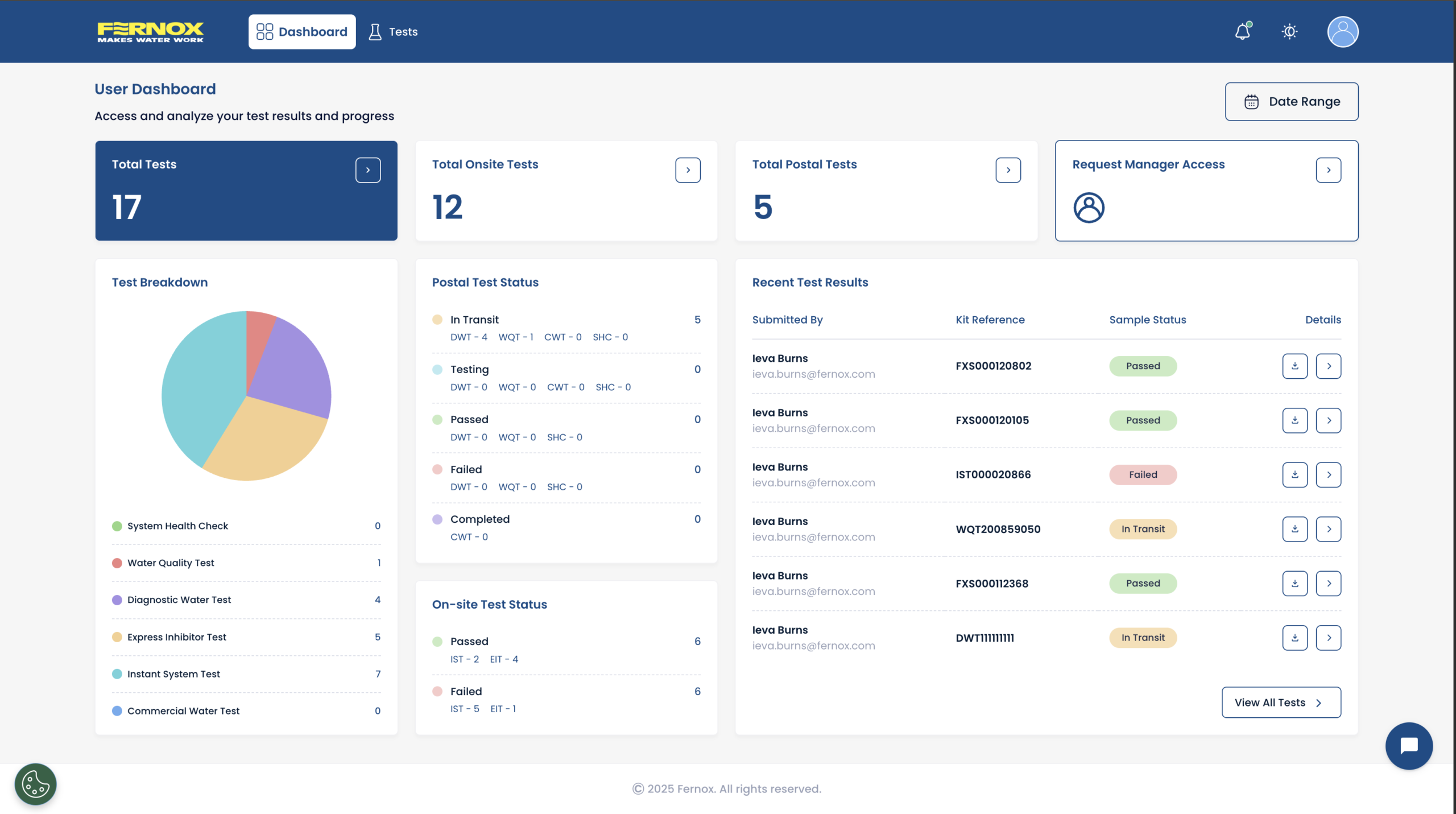
Aktualisierte Oberfläche mit verbesserter Zeilenhierarchie für schnelleres und einfacheres Scannen.
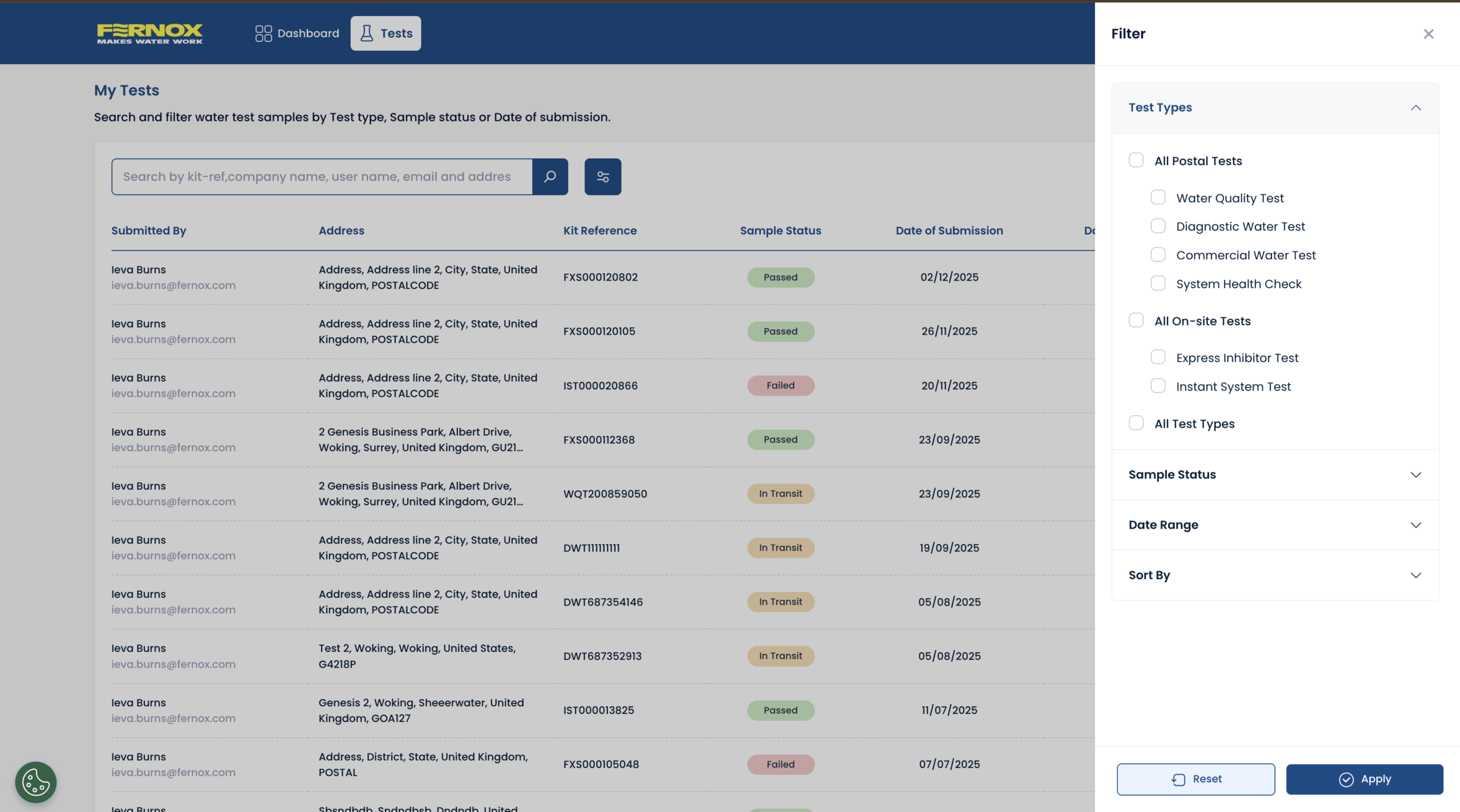
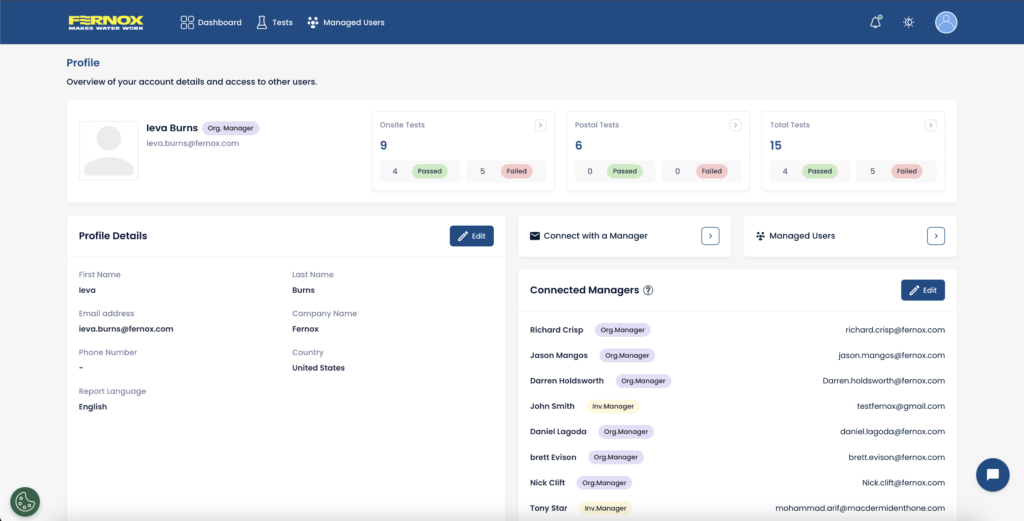
Der Profilbereich wurde vollständig überarbeitet, um den Nutzern eine vollständige Übersicht und Kontrolle über ihr Konto und eine Übersicht über die Manager zu geben, die ihre Tests einsehen können.
Über ihr Profil können Nutzer nun:
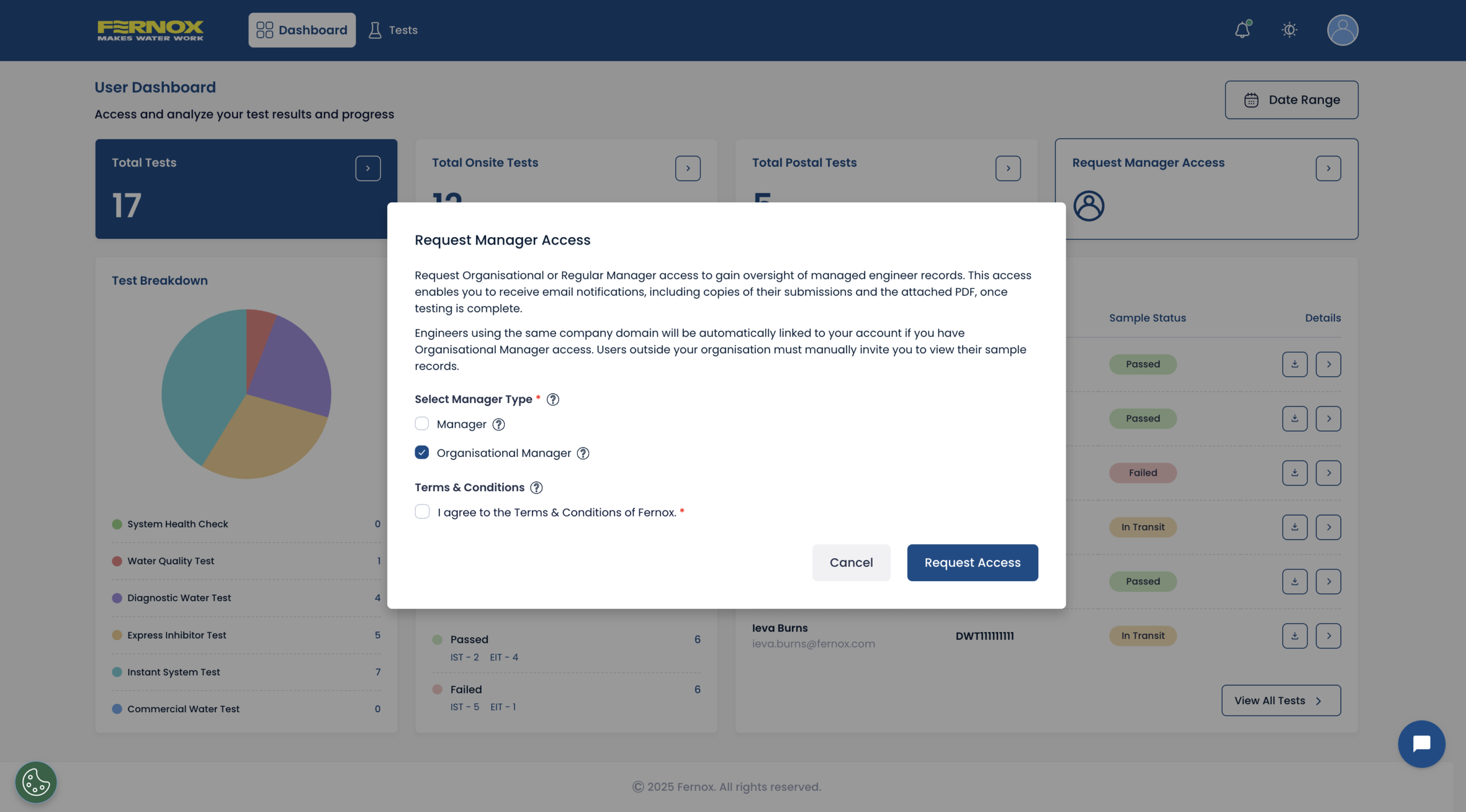
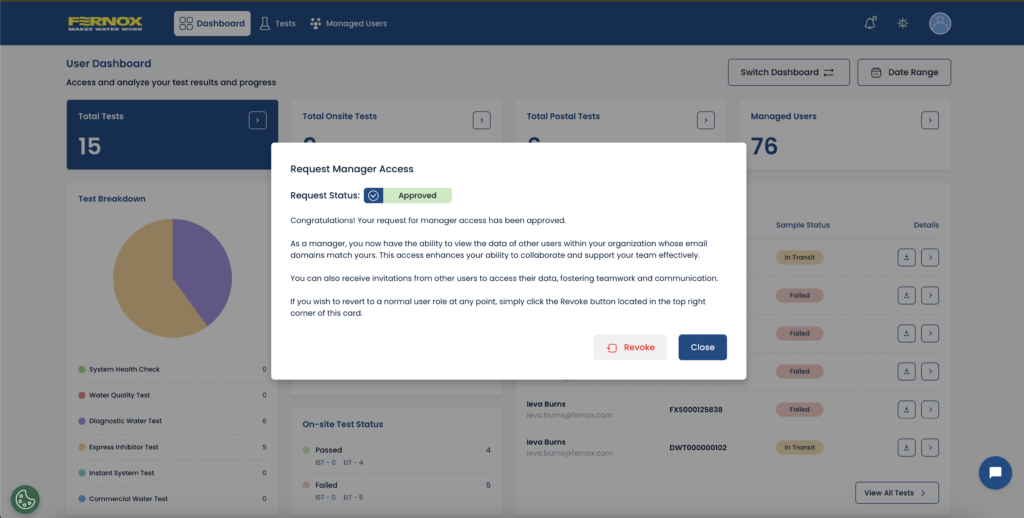
Die Beantragung von Managerzugriff ist jetzt einfacher – über die Quick Links auf dem Dashboard oder die Navigationsleiste des Profils.
Es gibt jetzt eine vollständig zentralisierte Einstellungsseite mit erweiterten Konfigurationsoptionen:
Die Manager von Unternehmen verfügen jetzt über leistungsfähigere Onboarding-Tools.
Dies beschleunigt das Onboarding, insbesondere bei großen Teams oder Organisationen mit mehreren Standorten.
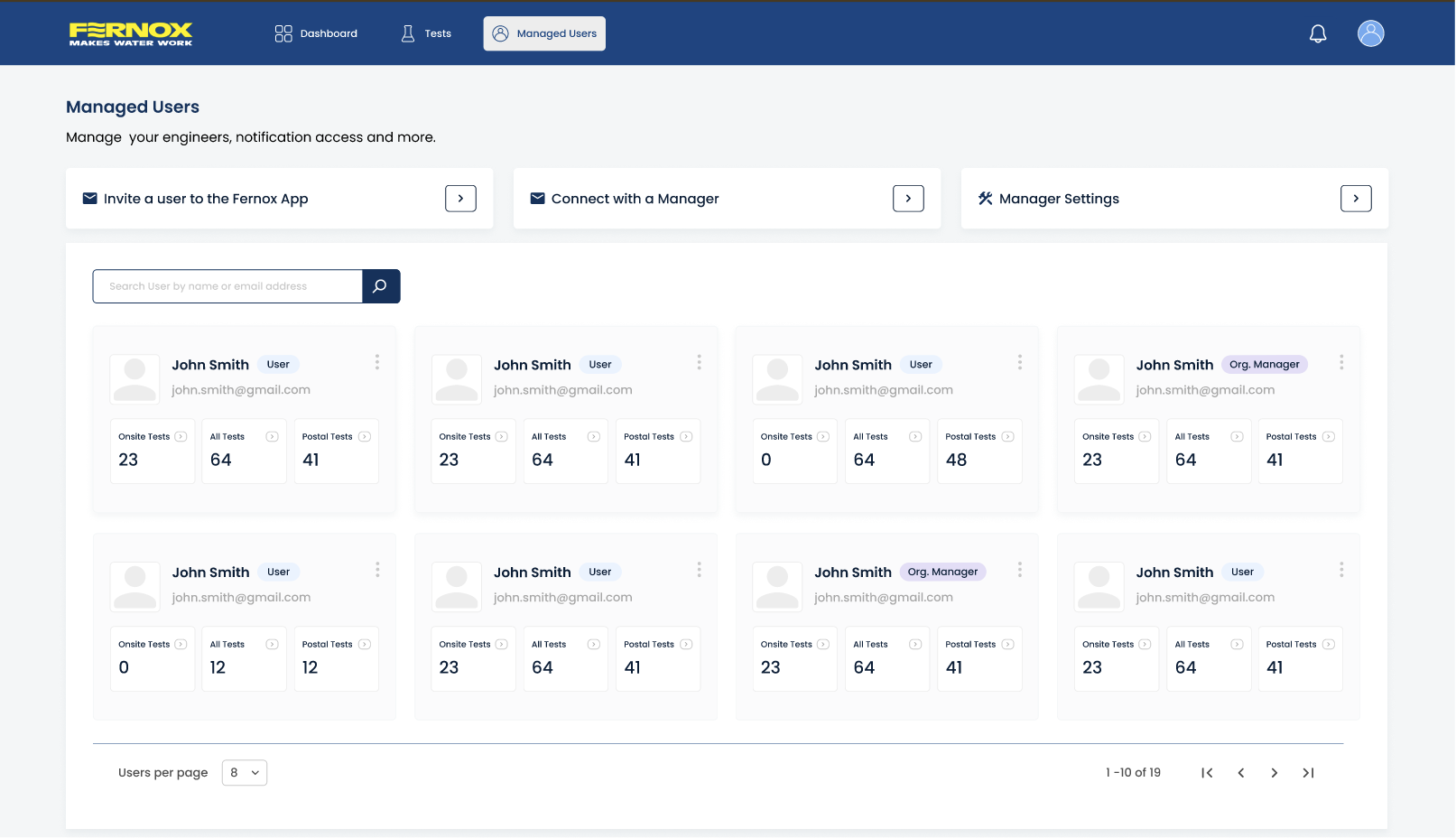
Manager können jetzt alle verwalteten Benutzer in einer einzigen, organisierten Übersicht auf der Manager-Zugangsseite sehen:
So erhalten Manager ein vollständiges operatives Dashboard zur Überwachung der Teamleistung.
Eine neue geografische Kartenübersicht wird es Benutzern und Managern bald ermöglichen:
Weitere Details folgen kurz vor dem Start.
Das kommende Datenexport-Tool wird es Benutzern ermöglichen:
Es wird eine leistungsfähigere Filterung entwickelt, die es Benutzern ermöglicht, die Tests einzugrenzen:
These refined filters will make it significantly easier to analyse and report on large sets of samples.
Wenn Sie Fragen haben oder Unterstützung bei der Umstellung benötigen, besuchen Sie unsere neue Support-Seite, sehen Sie sich unsere Leitfäden und Anleitungen für die Umstellung auf die neue Fernox App an oder wenden Sie sich an Ihren lokalen Fernox-Vertriebsmitarbeiter. Bei dringenden Fragen nutzen Sie bitte den Live-Chat, der von Montag bis Freitag von 9.00 bis 17.00 Uhr (UK, GMT+1) zur Verfügung steht.
Wir bedanken uns für Ihr Verständnis und Ihre Unterstützung bei der Durchführung dieser Verbesserungen, um Ihnen ein besseres und effizienteres Wasser-Test-Erlebnis zu bieten.
Vielen Dank für Ihr kontinuierliches Feedback – diese Aktualisierungen beruhen auf Ihren Vorschlägen und zielen darauf ab, Ihre täglichen Erfahrungen mit dem Portal zu verbessern.
We’re excited to share a major update to the Fernox Portal, bringing a range of improvements across the entire platform for both general users and managers, along with an early look at powerful new features currently in development.
The dashboard has been redesigned to give users a cleaner and more intuitive overview of their activity.
Key improvements include:
We’ve introduced a set of Quick Links that provide immediate access to core test sections:
These links are always visible on the dashboard, helping user’s shortcut their usual workflows and reach test lists with a single click.
Updated interface with improved row hierarchy for quicker, easier scanning.
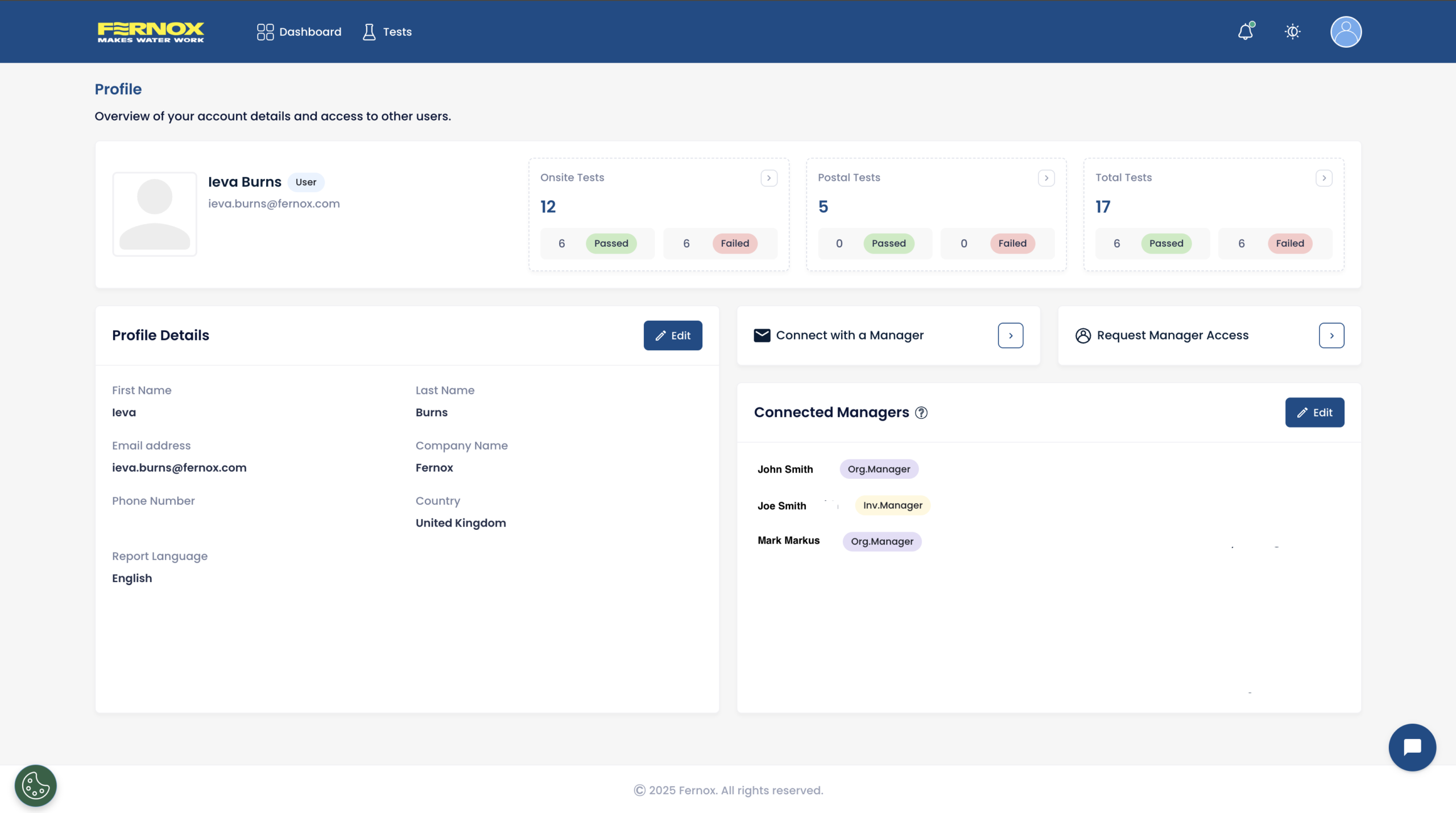
The Profile section has been fully rebuilt to give users complete visibility and control over their account and an overview of managers that can view their tests.
From their Profile users can now:
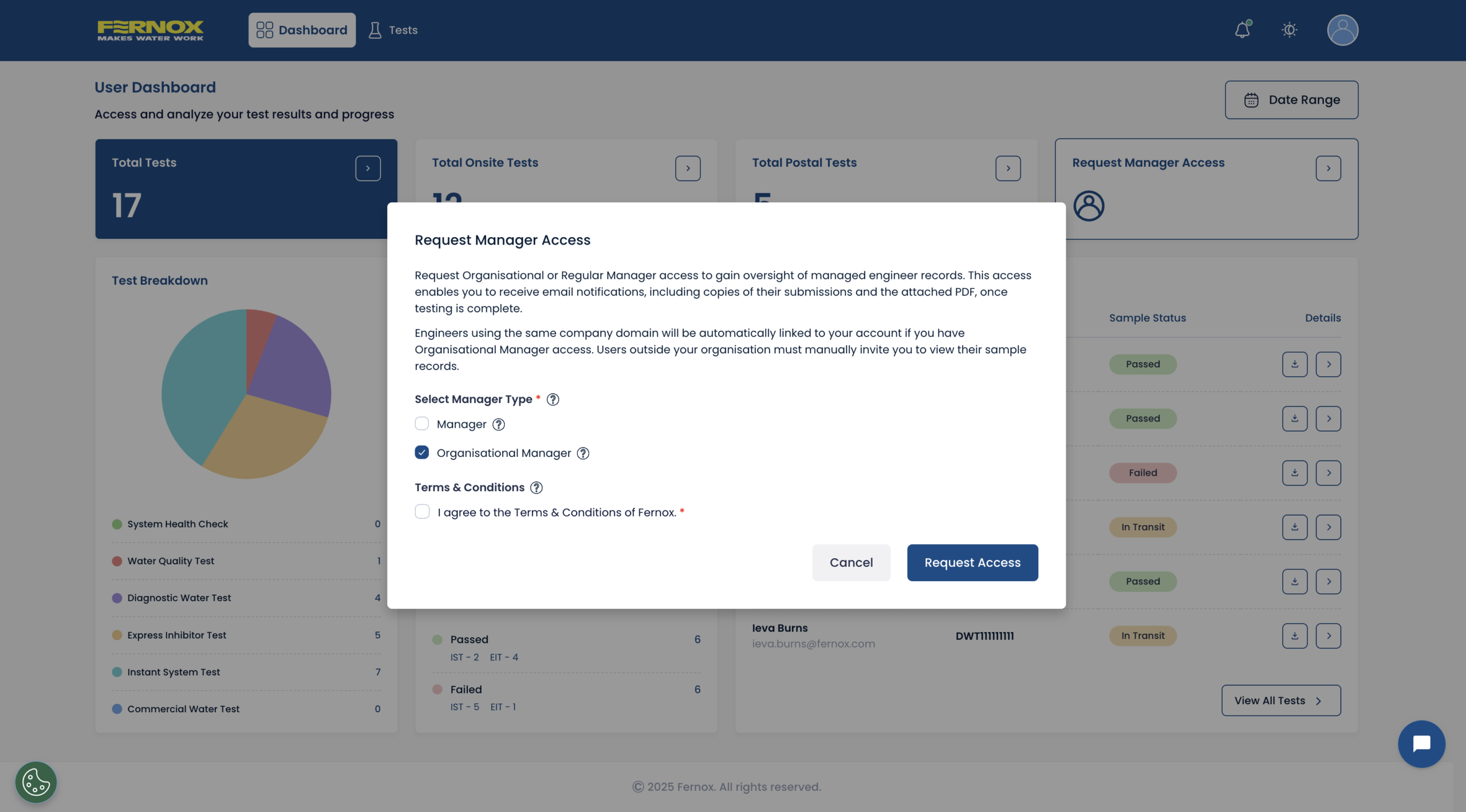
Requesting manager access is now easier—available from the dashboard Quick Links or the profile navigation bar.
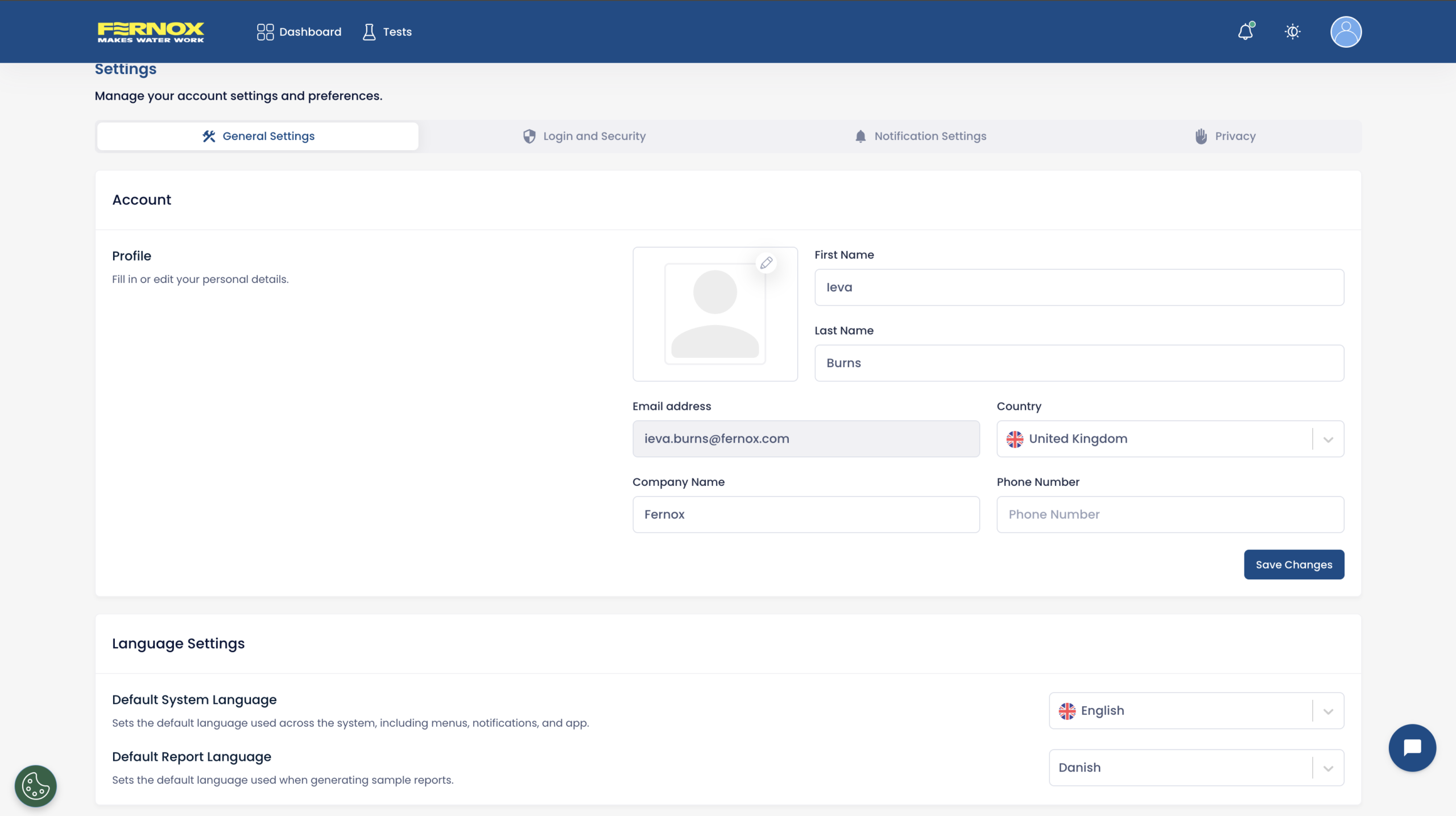
A fully centralised settings page is now available with expanded configuration options:
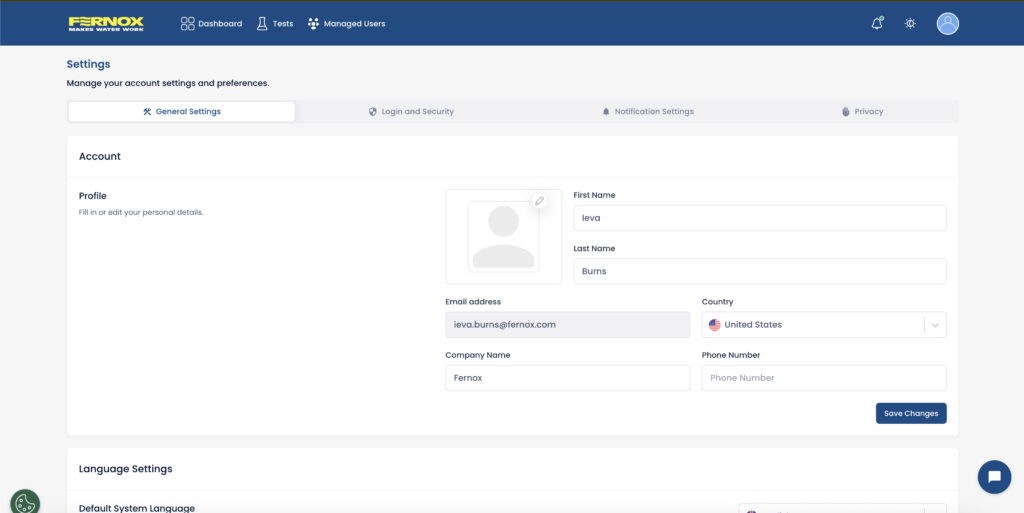
Organisational managers now have more powerful onboarding tools.
This speeds up onboarding, especially for large teams or multi-site organisations.
Managers can now view all managed users in a single, organised overview inside the manager access page:
This gives managers a complete operational dashboard for monitoring team performance.
A new geographical map overview will soon allow users and managers to:
More details will follow closer to launch.
The upcoming data export tool will allow users to:
More powerful filtering is being built to allow users to narrow tests by:
These refined filters will make it significantly easier to analyse and report on large sets of samples.
For any questions or if you need assistance during this transition, you can visit our new support page,check out our Guides & Instructions to help your transition to the new Fernox App or contact you local Fernox sales representative. For any urgent questions, please use the live chat, available Monday – Friday, 9am – 5pm (UK, GMT+1).
We appreciate your understanding and support as we make these improvements to provide you with a better, more efficient water testing experience.
Thank you for your continued feedback—these updates are driven by your suggestions and aimed at improving your day-to-day experience on the portal.
Nos complace compartir una importante actualización del Portal Fernox, que aporta una serie de mejoras en toda la plataforma tanto para usuarios generales como para los administradores, junto con un avance de las potentes nuevas funciones que se están desarrollando actualmente.
El panel de control se ha rediseñado para ofrecer a los usuarios una visión general más clara e intuitiva de su actividad.
Las mejoras clave incluyen:
Hemos introducido un conjunto de enlaces rápidos que proporcionan acceso inmediato a las secciones principales de la prueba:
Estos enlaces están siempre visibles en el panel de control, lo que ayuda a los usuarios a acortar sus flujos de trabajo habituales y acceder a las listas de pruebas con un solo clic.
Interfaz actualizada con una jerarquía de filas mejorada para un escaneo más rápido y sencillo.
La sección Perfil se ha rediseñado por completo para ofrecer a los usuarios una visibilidad y un control totales sobre su cuenta, así como una visión general de los administradores que pueden ver sus pruebas.
Desde su perfil, los usuarios ahora pueden:
Solicitar acceso de administrador ahora es más fácil: está disponible desde los enlaces rápidos del panel de control o la barra de navegación del perfil.
Una página de configuración totalmente centralizada página de configuración totalmente centralizada con opciones de configuración ampliadas:
Los administradores de organizaciones ahora disponen de herramientas de incorporación más potentes.
Esto agiliza la incorporación, especialmente en equipos grandes u organizaciones con múltiples sedes.
Los administradores ahora pueden ver todos los usuarios gestionados en una única descripción general organizada dentro de la página de acceso del administrador:
Esto proporciona a los gerentes un panel operativo completo para supervisar el rendimiento del equipo.
Una nueva vista general del mapa geográfico pronto permitirá a los usuarios y administradores:
Se proporcionarán más detalles a medida que se acerque la fecha de lanzamiento.
La próxima herramienta de exportación de datos permitirá a los usuarios:
Se está desarrollando un filtrado más potente para permitir a los usuarios restringir las pruebas por:
Estos filtros perfeccionados facilitarán considerablemente el análisis y la elaboración de informes sobre grandes conjuntos de muestras.
Si tiene alguna pregunta o necesita ayuda durante esta transición, puede visitar nuestra nueva página de asistencia, consultar nuestras Guías e instrucciones para ayudarle en la transición a la nueva aplicación Fernox o ponerse en contacto con su representante de ventas local de Fernox. Para cualquier pregunta urgente, utilice el chat en vivo, disponible de lunes a viernes, de 9:00 a 17:00 (Reino Unido, GMT+1).
Agradecemos su comprensión y apoyo mientras realizamos estas mejoras para ofrecerle una experiencia de análisis del agua mejor y más eficiente.
Gracias por sus continuos comentarios: estas actualizaciones se basan en sus sugerencias y tienen como objetivo mejorar su experiencia diaria en el portal.


